Text messages
Last updated 16 September 2026
Teoum — online booking software operated by James Jin, a sole proprietor — sends text messages to customers who book an appointment through a Teoum booking page and choose to receive them. This page describes exactly what that means.
Who sends the messages
Messages are sent by James Jin, operating as Teoum. Each message names the business you booked with, so you always know who it is from.
How you opt in
Consent is given on the booking form, and nowhere else. There is no keyword to text, no list you can be added to, and no way to be enrolled by anyone but yourself.
- You open a business’s public booking page, for example
/book/their-name. - You choose a service and an available time.
- You enter your name, mobile number and the address to be visited.
- Below those fields is a checkbox, unchecked by default and labelled Optional, reading:
Optional: text me about this appointment. I agree to receive text messages from James Jin — a confirmation now, and a reminder 24 hours before. You can book without ticking this. No marketing messages are sent. Message and data rates may apply. Reply STOP to opt out, HELP for help.
The name in that sentence is the business you are booking with, taken from its own settings — the same name that appears at the start of every message it sends. It is not the name of the software.
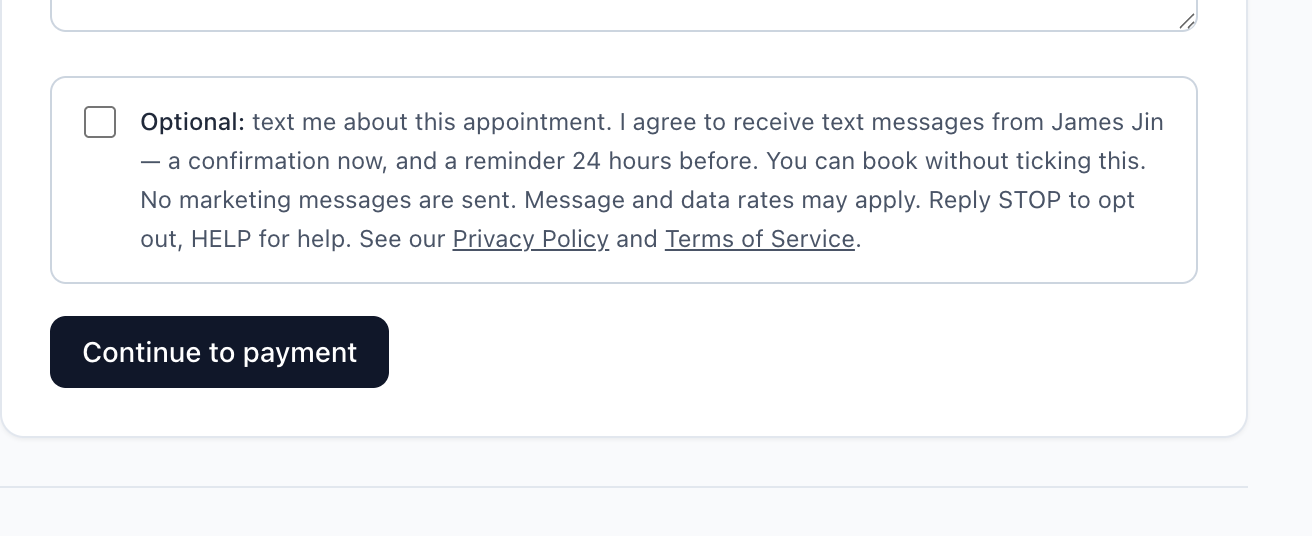
Ticking it is optional. Leaving it empty does not stop you booking; it means no messages are sent to you at all. The date and time you ticked it is recorded against your booking.
What you receive
Only messages about your own appointment. There is no marketing of any kind.
- A booking confirmation, immediately after you book
- A reminder 24 hours before your appointment
- A confirmation if you reschedule
- A notice if the business cancels your appointment
Typically two messages per appointment.
Every message that exists, exactly as it is sent:
- James Jin: you’re booked for Full groom on Tue, Oct 6, 2:00 PM. Need to change it? https://teoum.vercel.app/r/9f3c2a8b Reply STOP to opt out.
- Reminder from James Jin: Full groom tomorrow, Tue, Oct 6, 2:00 PM, at 120 Broad Ave. Change: https://teoum.vercel.app/r/9f3c2a8b
- James Jin has cancelled your Full groom on Tue, Oct 6, 2:00 PM. Any deposit is being refunded. Questions: (551) 290-8712
- James Jin: your Full groom is moved to Wed, Oct 7, 11:00 AM. See you then.
The opt-out instruction rides on the confirmation, which is the first message of the conversation. There are no other message types.
How to stop them
Reply STOP to any message. You will receive no further texts. Reply HELP for help, or email jinsengyy@gmail.com. Stopping texts does not cancel your appointment — the business can still reach you by phone.
Cost
Teoum does not charge you for messages. Message and data rates may apply — your mobile carrier’s standard charges are between you and them. Carriers are not liable for delayed or undelivered messages.
Your information
We do not sell or share your SMS opt-in data or personal information with third parties for marketing purposes. The full detail is in the Privacy Policy, and the terms that apply to your booking are in the Terms of Service.